Frequently Asked Questions

If you encounter any technical errors, such as pages not loading, broken links, unavailable resources, etc., please contact our technical support

We also suggest you delete the site's cookies stored in your browser or try accessing from a private browsing window.

When you find a book you want to borrow, just check that it belongs to the General Collection and present it at the Circulation module along with your ID card. Remember that the procedure is personal and the credential is indispensable.

If you are a new student and do not yet have a credential, you must present your ID and an official identification with photograph.

The entire UPAEP community has the same rights, so professors, students and collaborators can borrow the same amount of materials for two weeks.

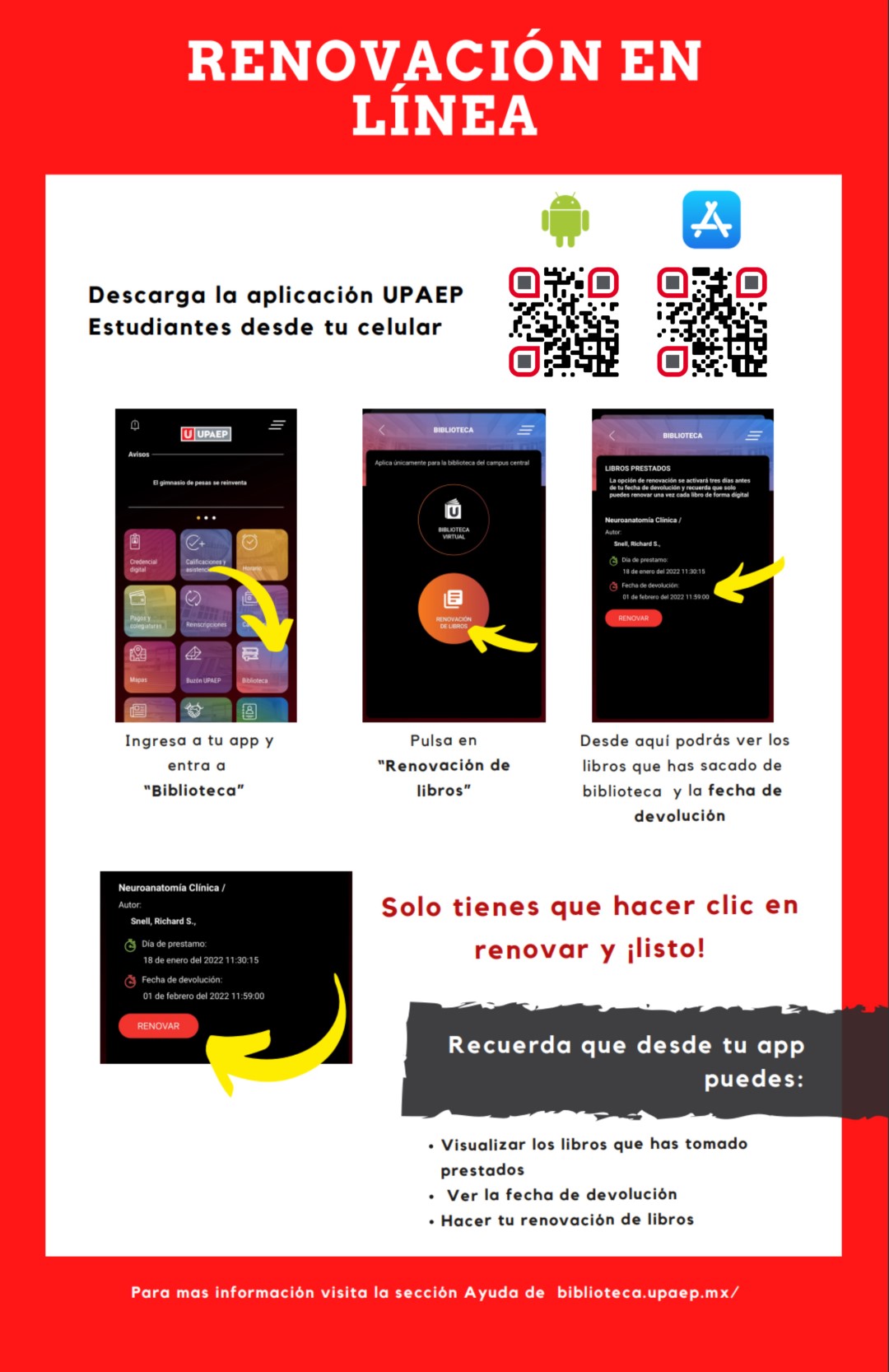
You can now renew your books from “My Bookshelf”, a new personal space to manage your loans, renewals and fines.

Access “My Bookshelf” with your institutional email.

If you do not return the book on the due date, you will be charged a fine of $10 MXN per day at the Central campus and Tehuacán libraries for each book not returned on time, and you will not be able to borrow more books until you pay.

We want the books to be used by as many users as possible; if you no longer use the books, you can return them before the due date.

For central campus students:

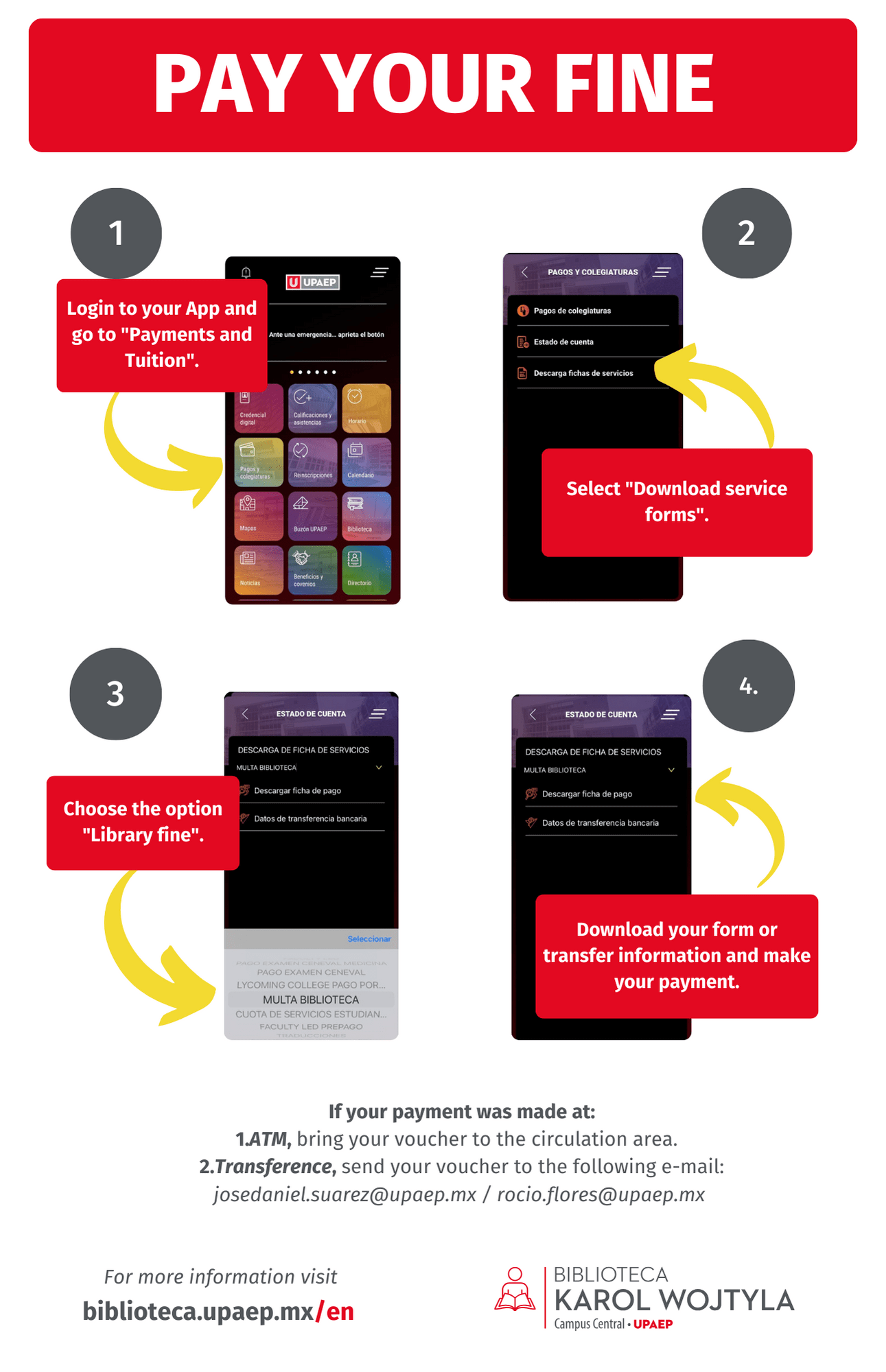
  1. Request the amount at the Circulation module or log in to My Bookshelf and check the Charges section.
  2. In the "Tuition and Payments" section of the UPAEP app, locate the "Payment References" option to obtain your reference number corresponding to Library Fines.*
  3. Make the payment at the bank window or ATM with your reference number. IMPORTANT: Make sure you have the correct reference.
  4. Wait a couple of hours for the payment to be reflected. You can verify your fine status in My Bookshelf.

That's it! once the payment shows as processed, you will be able to check out materials again. We recommend keeping a copy or photo of the receipt for any future clarifications.

*It is also possible to carry out this process through UNISOFT

For students in Tehuacán:

  1. Request the amount when returning the book or check the amount in My Bookshelf, in the "Charges" section.
  2. Go to SUI (Servicios Universitarios Integrales) to pay
  3. Present your voucher at the library to continue checking out books.

Not necessarily, but you will not be able to apply for new loans until you present your proof of payment. We recommend that you make the payment before the end of the cycle to avoid problems with re-enrollment and paperwork.

Your profile will most likely remain blocked, so you will have to go to the SUI to get the fine refunded or apply the balance to tuition fees.

You will have to pay the fine again with the correct reference.

In this case, you must go to the SUI with a copy of your proof of payment to proceed with the clarification.

In these cases, it is necessary to replace the book with another copy of the same edition (or more recent edition). Please try to do it before the due date, as the book will remain on loan to your profile until you return it and, if necessary, you will have to pay the accumulated fine. In case of mistreatment, we will deliver the mistreated copy to you after due physical processing.

Only General Collection books can be borrowed. We invite you to learn more about our collections and their characteristics.

Students and faculty from institutions with which the university has agreements can request books for loan or reading room consultation through the Interlibrary Loan (ILL) procedure. For more information, see the Interlibrary Loan section.

Help by digital resource

Databases and contracted tools

On the digital resources page you will find direct links to various help resources on each card. Some may be infographics, specialized pages, or even video tutorials.

In some cases you will find more than one icon, indicating that the resource has different help options to choose from. And while not all cards have help buttons, we are working to create tutorials, infographics or videos to teach you how to use the resource; meanwhile, remember that you can ask for help through our live advisories and by direct message on our social networks.

Emerald
Emerald Social sciences
Resource type:

Tutorials

Book search

Interactive

Book renewal

Infographic

Fines payment

Infographic

APA Style

Infographics

Reliable information and research

Infographics

Interface of a metasearch engine

Video

Advanced search

Video

Quote

Video

Introduction to office automation

Video

Defining information needs

Video

Booleans and wildcards

Video

Keywords

Video

Open Access

Video

Mendeley Reference Manager

Playlist

Information Literacy workshop

Playlist

Bibliotizate

Playlist

2022 Training Seminars

Playlist

Site Map